Ever wonder what makes the Millennium Falcon's hyperdrive feel so powerful or a giant mech's footsteps so terrifying? It's not just the visuals—it's the meticulously designed machines sound effects that sell the illusion. This guide is your blueprint for creating those sounds, from the subtle hum of a server farm to the deafening roar of a futuristic engine. We're going to give machinery a voice that captivates and convinces.
Mechanical audio is so much more than background noise; it's a core storytelling tool. The specific whirs, clanks, and hums you design can instantly tell an audience about an object's size, its power source, and even its personality. Think about it: a rickety old elevator groaning its way up a shaft tells a completely different story than the whisper-quiet glide of a maglev train.
This sonic language is what builds immersive worlds and drives narratives forward in film, games, and podcasts. We'll move beyond just hitting "record" and dive into the art of giving machinery a distinct, memorable voice. You'll get a look at the complete workflow professional sound designers use every day.
We're covering the entire process from concept to completion, with actionable techniques you can put to use right away. Here’s a peek at what's coming up:
The demand for high-quality audio has never been higher. The sound effects software market—the very tools we use for this work—was valued at USD 3.5 billion in 2024 and is on track to hit USD 7.1 billion by 2033. This boom shows just how vital realistic machine sounds have become in modern entertainment.
To really nail machine sound effects, it helps to understand the physics behind them. Thinking about things like the engineering quieter mechanical sounds gives you insight into what creates a sound in the first place. Once you understand the source, you can recreate or manipulate its audio signature with far more authenticity.
Every great machine sound effect is built from high-quality raw ingredients. Before you can start twisting, layering, and processing, you need a solid sonic palette to work with. This foundation really comes down to two approaches: capturing real-world sounds through field recording and creating completely new tones with synthesis.
Think of field recording as a sonic treasure hunt. The world is absolutely packed with incredible mechanical noises, often in places you'd least expect. Your dishwasher’s rhythmic cycle, the low hum of a server rack, or even the subtle clicks and whirs of an old VCR can become the heart of a complex sound design. You don't need a million-dollar setup to get started; a decent portable recorder and a good pair of headphones are more than enough.
To get those truly unique textures, you'll want to experiment with different microphone types. A standard condenser mic is perfect for capturing general ambience, like the distant rumble of an industrial park, but the real magic often happens when you use more specialized tools.
Building a personal library of these unique recordings is what will set your work apart from designers who just pull from commercial libraries. If you're just starting to assemble your gear, our guide on how to build a home recording studio is a fantastic resource for getting your creative space set up right.
While recording gives you realism, synthesis gives you absolute control. Using a synthesizer, you can build machine sound effects from the ground up, which is essential for sci-fi, futuristic, or abstract designs that simply don't exist in our world. You become the architect of the sound’s very DNA.
The secret weapon for synthetic machine design is often the Low-Frequency Oscillator (LFO). By using an LFO to slowly modulate parameters like pitch, filter cutoff, or amplitude, you can create the repeating, cyclical movements that define so many machines—think servo motors, pulsing engines, or scanning alarms.
Start simple with basic waveforms. A sine wave can easily become a deep, ominous hum. A sawtooth wave can be filtered down to create a harsh, grinding gear. The real power comes from modulation and automation. For instance, try automating the pitch of a square wave with a fast, jerky envelope to create the sound of a robotic servo motor straining to move something heavy. Don't forget to play with noise generators to add steam hisses, electrical static, or airy textures.
When you start combining these synthesized elements with your field recordings, you create a sonic toolkit that is both authentic and endlessly creative.
A single recording or synthesized sound is rarely enough. The real magic—the weight, complexity, and believability of a great machine sound effect—happens when you start layering multiple audio sources and applying some thoughtful processing. This is the part where you take the raw ingredients and sculpt them into a final, polished sound.
Think about designing the sound for a heavy hydraulic door on a spaceship. One sound by itself will just feel weak and unconvincing. The secret is to think in layers, where each component tells a different part of the story.
This is the basic workflow we're talking about, from finding your sounds to putting them all together.
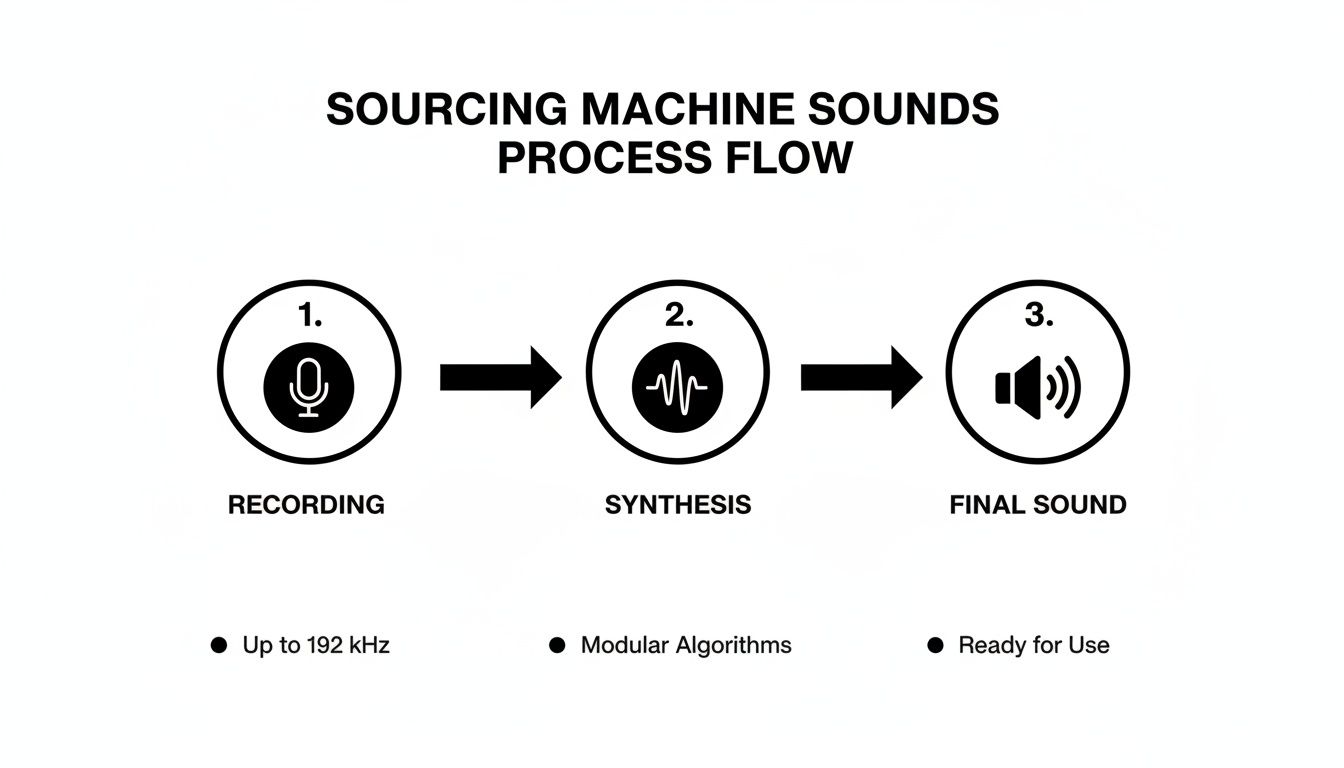
Whether you’re out in the field with a recorder or generating sounds from scratch, your goal is to capture distinct sonic elements that you can blend later on.
Let's stick with our hydraulic door example. A really effective design could be built from three core layers, with each one playing a specific role in the final sound.
When you play these three sounds together, you get a composite effect that's far more detailed and convincing than any single recording could ever be. The hiss defines the start, the scrape defines the motion, and the rumble defines the scale.
Layering isn’t just about stacking sounds; it's about giving each sound its own job. One layer might handle the high-frequency detail, another the mid-range character, and a third the low-end power. This separation is key to creating a clean, defined, and impactful final effect.
Once you have your layers arranged in your DAW's timeline, the next job is to make them play nicely together. Without processing, your layers will likely just clash and create a muddy, indistinct mess. A good processing chain helps carve out a specific space for each element so it can be heard clearly.
My workflow usually involves treating each layer on its own before processing them as a unified group.
Let's take a look at the essential tools you'll be using to glue these sounds together.
This table breaks down the common audio processors I use for machine sound design, explaining their purpose and how you might apply them in a real-world scenario like our hydraulic door.
| Processing Tool | Primary Function | Example Application |
|---|---|---|
| Equalization (EQ) | To shape the frequency content of a sound, removing unwanted frequencies and boosting desirable ones. | On the pneumatic hiss, use a high-pass filter to cut out all the low-end mud that isn't needed. For the metal scrape, carve out some space in the mid-range to help it stand out. With the sub-bass rumble, apply a low-pass filter to make sure it stays deep in the subsonic territory. This is crucial for preventing frequency masking, where one sound completely hides another. |
| Compression | To control the dynamic range of a sound, making quiet parts louder and loud parts quieter for a consistent volume. | Apply some light compression to the metal scrape to even out its volume fluctuations. This can add a satisfying punch and make the door's movement feel more consistent and powerful from start to finish. You want control, not a squashed, lifeless sound. |
| Reverb | To place a sound in a virtual acoustic space, adding a sense of environment and depth. | To make it sound like the door is actually somewhere, send all three layers to a single reverb bus. If the door is in a huge hangar bay, a long reverb with a metallic, echoey character is perfect. If it's in a tight corridor, a short, tight reverb works better. The type of reverb you choose tells a huge part of the story. If you're interested in how to realistically simulate different spaces, you can learn more about convolution reverb and see how powerful it can be for placing sounds in a scene. |
Mastering these processing tools is just as important as the sounds you choose. By carefully layering your sonic elements and using processing to give each one its own defined space, you can transform simple recordings into dynamic, detailed, and utterly convincing machine sound effects.
Designing a killer machine sound is one thing, but that's really only half the job. The real test comes when you drop that sound into its final home—be it a sprawling game world or a tightly edited film. How it performs in context is everything.
A sound that feels epic in a cinematic close-up can become grating and repetitive in a game where the player hears it a thousand times. This is a classic challenge in game audio, where our primary goal is to maintain immersion without driving the player crazy.
When it comes to game development, two words are gospel for machine sound effects: seamless looping and variation. Think about a vehicle engine. It's not one static sound file; it's a living system that has to respond instantly to the player hitting the gas or slamming on the brakes.
This is usually handled by creating a handful of perfectly seamless loops at different RPMs (Revolutions Per Minute). The game's physics engine then crossfades between them in real-time. A single, badly looped engine drone can break a player's immersion in a heartbeat.
To fight off repetition for things like mechanical footsteps or weapon reloads, you need to create multiple versions. Even tiny differences in pitch, timing, or filtering across 3-5 alternate takes of the same sound can make a world of difference. The game’s audio engine can then shuffle through these variations randomly, making the soundscape feel far more organic.
A great pro tip is to render your variations from the same source material but with slightly different processing. Nudge the EQ on one, add a bit of grit to another, and sharpen the transient on a third. This keeps the core character consistent but provides just enough variety to fool the ear.
With film, the focus shifts from interactivity to storytelling. Your machine sound has to find its place alongside dialogue, the musical score, and foley, all while serving the narrative. This is where mixing and automation become your best friends, letting you perfectly sync sound to on-screen action for maximum emotional punch.
Picture a scene with a massive factory press. You can use volume automation in your DAW to make the sound swell just before impact, building a sense of dread. Panning automation can make a sound follow a machine's movement across the frame, anchoring the audio to the visual and locking it into the scene.
Finally, don't overlook the technical nuts and bolts. Getting your organization and formatting right from the start will save you a world of headaches down the line.
File Formats: For games, compressed formats like .OGG are a popular choice to keep file sizes manageable. Film post-production, on the other hand, demands the highest quality, so uncompressed .WAV or .AIFF files at 24-bit/48kHz (or higher) are the professional standard.
Metadata: Take the time to embed descriptive tags into your files (e.g., "hydraulic," "heavy," "metal scrape," "sci-fi"). When you’re trying to find that one specific sound in a library of thousands, you’ll thank yourself.
Licensing: It's common to supplement your custom work with commercial libraries. Always, always read the End User License Agreement (EULA) to make sure you have the right permissions for your specific project.
The value of this detailed work is clear. The global sound effects services market hit USD 2.5 billion in 2023 and is expected to reach USD 4.8 billion by 2032. This explosive growth is driven by the demand for high-quality, immersive audio in film, gaming, and advertising—where great sound can boost viewer retention by as much as 25%. You can dig into these market insights in the full report on DataIntelo.
 Okay, so you've got the hang of recording and layering. Now for the fun part. This is where we move past just recreating reality and start inventing it. We’re talking about creating machines sound effects that feel truly special and memorable—the kind of sounds that are impossible to just go out and record. To do that, we need to dive into some more advanced synthesis.
First up is a personal favorite of mine: granular synthesis. Forget playing a sound file from start to finish. A granular synth shatters your audio into microscopic fragments, or "grains," and lets you piece them back together in completely new ways. You can stretch, warp, and totally mangle any sound you feed it.
Let's say you have a single, sharp recording of a wrench hitting a metal plate. In the hands of a granular synth, that one little clang can become a universe of sound. The creative potential is just massive.
The magic of granular is how it unlocks the hidden character inside sounds you already have. It’s all about experimentation and leaning into those happy accidents that often become the coolest, most defining sound in a project.
Another incredible tool is physics-based synthesis. Instead of messing with oscillators and filters, these plugins actually simulate the physical properties of objects. You can tell it you want the sound of a small glass object hitting a large wooden one, define the force, and it generates the result. It's wild.
This approach is a lifesaver for creating ultra-believable gear grinds, stress creaks, and impacts that are a nightmare to capture cleanly with a mic. And because it’s a simulation, you can create endless variations by just nudging the parameters. This is huge for games, where you can avoid the repetitive "machine-gun" effect of the same sample playing over and over.
Of course, sometimes you need a unique sound right now. For creators who need to work fast, an AI sound effect generator can be a fantastic way to knock out custom audio assets using simple text prompts.
To really get your creative muscles working, try giving yourself some abstract challenges.
Exercises like these push you to think outside the box and combine different techniques. Ultimately, the goal is to develop your own sonic signature—that unique voice that makes people really listen.
Even with the best plan, you're going to hit some creative roadblocks when designing machine sound effects. It just comes with the territory. I’ve heard the same questions pop up over and over from designers at every level, so let's dig into a couple of the most common ones.
This is the big one, right? You can't just go out and record a hyperdrive or a futuristic combat mech. The secret here is to stop thinking about the machine and start thinking about the feeling.
What does a starship's warp core feel like? It probably feels massive, powerful, and electric. So, where can you find those feelings in the real world? You could start by recording the deep, vibrating hum of a large power transformer. For that electric crackle, maybe a Jacob's ladder or even some high-voltage arc sounds could work.
Once you have those organic recordings, you can start blending in synthesized elements to push them into the sci-fi realm. A low, pulsing sine wave can give it that immense, room-shaking weight. Running some white noise through a flanger can create that sense of unstable, raw energy.
The trick is to break down the fictional sound into its core emotional components—power, instability, size, speed—and then hunt down real-world or synthetic sounds that capture those specific qualities.
Listener fatigue is a huge problem, especially in game audio. That perfect engine loop you designed can become incredibly annoying after hearing it for an hour straight. The same goes for robotic footsteps, servo movements, or machine gun fire. The solution is simple: variation. Never, ever rely on just one sound file for a repeating action.
Here’s how to fight the repetition:
This isn't just about avoiding annoyance. It’s about making the world feel reactive and alive. When the audio responds directly to what's happening on screen, it pulls the user deeper into the experience. The best machine sounds aren't just background noise; they're an active part of a living, breathing world.
Ready to build your own custom machine sounds in seconds? SFX Engine is a free AI-powered sound generator that lets you craft unique, royalty-free audio from simple text prompts. Find the perfect sound for your film, game, or podcast at https://sfxengine.com.
